

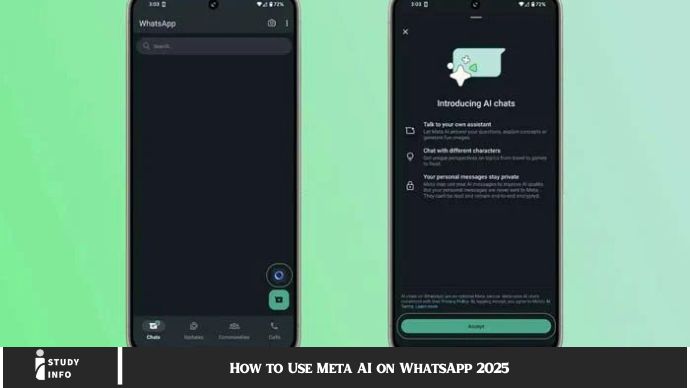
How to Use Meta AI on WhatsApp 2025 Meta AI is revolutionizing how we communicate. WhatsApp, one of the world’s most popular messaging apps, now harnesses the power of AI, enabling smarter and more efficient conversations. Whether you’re using WhatsApp for personal communication or business purposes, Meta AI integration can enhance your experience. In this article, we’ll explore how to use Meta AI on WhatsApp, step by step, so you can take advantage of all the amazing features.
What Is Meta AI on WhatsApp?
Meta AI refers to artificial intelligence technologies implemented by Meta (formerly Facebook) on platforms like WhatsApp, Facebook, and Instagram. In WhatsApp, Meta AI allows the app to deliver smarter features that improve messaging quality, convenience, and user experience.
By using Meta AI, WhatsApp can analyze conversations and provide suggestions, automate tasks, and personalize interactions. This integration makes your messages more meaningful and responsive while improving communication efficiency.
Why Meta AI Is a Game Changer on WhatsApp
Meta AI enhances WhatsApp by adding intelligent features that not only make your life easier but also boost productivity. Here are a few reasons why this integration is a game-changer:
- Personalized User Experience: Meta AI tailors suggestions based on your previous conversations, making interactions smoother.
- Smart Automation: It can automate repetitive tasks like answering common queries or scheduling reminders, saving you time.
- Enhanced Communication: AI-driven features like automatic translation and speech-to-text make communicating across languages easier.
- Business Efficiency: Meta AI is especially beneficial for businesses, offering features like automated responses, smart chatbots, and data-driven insights.
How to Enable Meta AI Features on WhatsApp
To start using Meta AI on WhatsApp, ensure your app is updated to the latest version. Once updated, here’s how to enable AI features:
- Update WhatsApp: Go to your app store (Google Play or Apple App Store) and ensure WhatsApp is up-to-date.
- Enable AI Features: Open WhatsApp, go to “Settings,” and find the “AI Features” section. Toggle the settings to enable features like auto-translation, smart replies, and more.
- Allow Permissions: For full functionality, WhatsApp may ask for permissions, such as access to your microphone or contacts.
By enabling these features, you can start using Meta AI in WhatsApp chats right away.
Top Features of Meta AI on WhatsApp
Meta AI offers a wide range of features that can significantly improve your WhatsApp experience. Here’s a closer look at the best ones:
Smart Replies
Meta AI can suggest quick, context-relevant responses to save you time typing. Whether you’re replying to a casual message or responding to a work-related inquiry, the AI will offer a smart response based on the context of the conversation. These can be in the form of a text reply, emoji, or a quick action like confirming a meeting time.
Automated Chatbots for Businesses
Businesses can integrate Meta AI chatbots into their WhatsApp accounts. These chatbots can instantly reply to customer inquiries, schedule appointments, and even resolve basic issues. This feature helps businesses maintain a round-the-clock presence, improving customer service and satisfaction.
Smart Translation
Meta AI uses advanced language processing to offer real-time translation for messages in different languages. This feature is especially useful when communicating with international clients or friends who speak a different language. No need to leave WhatsApp to use a translation tool – the AI does all the hard work within the app.
Voice-to-Text Transcription
Another fantastic feature of Meta AI is voice-to-text transcription. If you prefer to speak rather than type, this feature automatically converts your voice messages into text. Whether you’re driving or in a busy environment, Meta AI ensures you never miss out on important information.
How Meta AI Enhances WhatsApp Business Communication
For businesses using WhatsApp to communicate with customers, Meta AI brings multiple advantages. Here are some ways Meta AI can make business communication smoother:
Chatbots for 24/7 Customer Support
Meta AI allows businesses to set up sophisticated chatbots to handle customer inquiries. Whether it’s responding to product questions, processing orders, or providing support, chatbots save businesses time while enhancing customer satisfaction. Businesses no longer need to rely on human agents for every simple query.
Automation of Scheduling and Reminders
With Meta AI’s integration, businesses can schedule messages, set reminders, or send follow-up notifications automatically. This feature helps streamline operations and improves productivity.
Personalized Marketing Campaigns
Meta AI also helps businesses target the right audience with personalized messages based on user behavior. By analyzing customer interactions, Meta AI can recommend products, send personalized offers, and even update customers on their orders or subscriptions.
Best Practices for Using Meta AI on WhatsApp
To make the most of Meta AI on WhatsApp, here are a few best practices you should keep in mind:
1. Set Up Automated Responses
For businesses, setting up automated responses for frequently asked questions is essential. Whether you’re responding to inquiries about working hours, pricing, or product features, automated replies save time and ensure consistency.
2. Enable Smart Replies
Smart replies are fantastic for personal use as well. Enable the feature so you can quickly respond to friends, family, and colleagues without having to type out long responses. Just tap and send!
3. Use Translation Features
Traveling or communicating with friends across the globe? Make sure the smart translation feature is enabled. This allows you to chat in real time without worrying about language barriers.
4. Optimize Your Profile for Business
For businesses, ensure that your WhatsApp profile is optimized with clear, up-to-date information like your business hours, address, and website. With Meta AI, this information can be more easily integrated into your automated responses.
5. Leverage Analytics
Meta AI provides useful analytics that can give you insight into user interactions, response times, and more. Use these metrics to refine your communication strategy for better engagement.
How Meta AI Improves Security on WhatsApp
Security is a top priority for Meta, and AI plays a role in enhancing the safety of your messages on WhatsApp. Meta AI’s security features include:
- Fraud Detection: AI can help detect suspicious activity and flag it to prevent fraud or scams.
- End-to-End Encryption: All messages are encrypted, ensuring privacy between you and your contacts, whether personal or business-related.
- Spam Protection: Meta AI can identify and block spam accounts, keeping your WhatsApp experience safe and free from unwanted interruptions.
May you also like it:
How to Delete Your Telegram Account: A Step-by-Step Guide 2025
How to Create a Telegram Account: 10 Easy Methods [2025]
Telegram Channels: How to Find and Join Telegram Groups or Channels [2025]
FAQ
1. What is Meta AI on WhatsApp?
Meta AI integrates artificial intelligence features into WhatsApp, enhancing user experience with features like smart replies, chatbots, and real-time translation.
2. How do I enable Meta AI on WhatsApp?
To enable Meta AI, update your WhatsApp app to the latest version, go to settings, and toggle the AI features you want to use.
3. Can businesses use Meta AI on WhatsApp?
Yes! Meta AI offers businesses tools like chatbots and automated responses to enhance customer communication and service.
4. Is Meta AI available in all countries?
Meta AI features are available globally, though certain features may vary depending on your region.
5. How does Meta AI improve WhatsApp security?
Meta AI helps detect fraudulent activity, blocks spam, and ensures messages are securely encrypted.
6. Can I use Meta AI for voice-to-text messages?
Yes! Meta AI automatically transcribes voice messages into text, making it easier to read messages when you can’t listen.
Conclusion
Meta AI on WhatsApp is a game-changer, offering advanced features that streamline communication, enhance security, and improve productivity. From smart replies to automated chatbots and language translation, these AI-powered tools make using WhatsApp more efficient and enjoyable. By embracing these technologies, you can boost personal and business communication, save time, and stay ahead in today’s fast-paced world.
